Posts

Easter is coming!

Image
OK,  I know it's only February . But I'm already getting ready. This time something simpler than my first basket with ribbon . The new basket is designed for A4 format, supported by most craft plotters, like Cameo Portrait. Cut files available at lottain.etsy.com

Paper basket with ribbon

Image
The basket for patient crafters - threading the ribbon through the paper parts is laborious, but the effect is worth of it. And besides - we don't buy expensive cutting plotters to make simple boxes :-)     Tools & materials: - cutting plotter supporting A4 or A3 format (I have Silhouette Cameo 4) - A4 or A3 cardboard, ca. 170-200 gsm ( in A3 version the basket body is cut from one paper sheet, in A 4 version it consists of two pieces). - glue - ribbon, 12 mm width, 70-80 cm length Cut files available at LottaIn Etsy Shop .  1.   Cut the body and the bottom. The red line in the design is the fold, not the cut. I've used the "Score" option in my Cameo 4, and it's a good idea to test settings first. The default force for coverstock was 20 and the first try was a failure - the triangle tabs  were practically cut out. The value of 1 was really enough! You can also remove that line and fold paper manually.  2. Glue the ends together. The first and the...

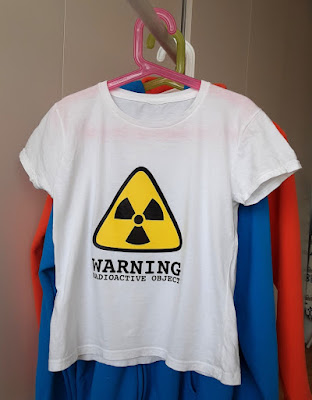
"radioactive" t-shirt (free pattern)

Image
My daughter isn't a princess type. She hates dresses, ruffles - loves computers and robots. Even a little bit older adventure books she finds "archaic", because there's no modern technique in them. So, I wasn't surprised with her next t-shirt design... Tools & materials: - Silhouette Cameo 4 - Siser heat transfer vinyl ( HTV) , colors: A0003  lemon, A0019 black - iron Download free design: pdf , svg  

PixScan mat error - problem solved!

Image
One of the most interesting features of the Cameo plotter is the PixScan mat. But my (and not only mine) first try was a failure. I've wasted a lot of time and each time got an error: failed to detect registration marks . After an Internet search I found many advises, but none of them worked. I tried to load the mat a little bit more on the right or on the left, to rotate it, to use stronger light or to work in the daylight, to set the sensor manually...  Still the same error. Finally I began to read negative comments at Amazon.com. And... there was the solution: I turned the flashlight on on my phone and was shining it right at the registration marks. I tried and it really works! The optic scanner of the device needs a good light, but not only its power is important, also a direction. So, don't place your lamp over the device, as we usually do, working at the table. The source of light should be more on the left and quite low, shining actually into the device - as on the phot...