Posts

Showing posts with the label cutting plotter

Felt angels

Image
A perfect project to make with children. Each little angel can be different – and every one of them will be cute! The template is available in two formats: a printable PDF (A4 and US Letter) and an SVG file suitable for cutting with a cutting machine: download .       I made this pattern quite a while ago and unfortunately didn’t think to take step-by-step photos. However, the construction is so simple that I’m sure they aren’t really necessary.   Cut the pattern.  Embroider or draw a face on one of the circles. Sew them together outside with the overcast or blanket  stitch, leaving 1,5 cm hole at the bottom of the head. Stuff with polyester filling. Cut the body (dress), decorate with lace, beads, sequins and whatever you like. Sew the edges together on the wrong side. Reverse. You have got the cone now. Put its tip into the hole in the head. Sew both parts together. Make hair. Sew wings to angel's back. Done!

Pop Up Christmas Wreath

Image
Maybe I’m just unlucky when it comes to holiday designs, or maybe the competition is simply too fierce, because these are probably the worst-selling designs in my collection. But I still couldn’t resist designing another one. Cut files for plotters (svg, pdf, studio3) are available at lottain.etsy.com (pat. 035)    The set includes a greeting card template (5 x 7 in / 127 x 178 mm)  and a matching envelope template. Use LOTTABLOG code by checkout to get 30% discount.       Difficulty level: Very easy. The pop-up mechanism consists of just one piece. Only applying the tiny background elements may take a little time and patience. Tools & Materials: cutting plotter supporting A4 format colour printer (an inkjet one is recommended) A4 cardboard, ca. 170-200 gsm for the card A4 thinner craft paper for the envelope (ca. 90-120 gsm) glitter paper for stars and snowflakes  paper glue optionally - double sided adhesive tape Tips: I recommend using a low-tac...

My funny Valentine... mouse

Image
Mice are so cute (as long as they're not raiding your pantry). Cut files are available at lottain.etsy.com (pat. 046) - use LOTTABLOG code by checkout to get 30% discount. Is it difficult or very time consuming? You can judge for yourself, just watch the videotutorial: https://youtu.be/xK94oody7aE The detailed written assembly instruction (pdf) is available after purchase.          

Peek-a-boo!

Image
I still have no shortage of pop-up card ideas. I hope you like cute bunnies. Cut files are available at lottain.etsy.com (pat. 040) - use LOTTABLOG code by checkout to get 30% discount.         And here's the card in action:      

The most irritating Cricut issue

You've just loaded svg into Cricut Design Space and some parts of the template are huge or tiny? It's not because the file is incorrectly designed! It's the well known bug in Cricut software. DS just resizes the pieces of the pattern randomly - many Cricut users complain about this issue for years and... it still hasn't been fixed.  Here's my collection of links describing the problem: https://www.reddit.com/r/cricut/comments/ghlkmk/size_changes_when_uploading_to_cricut_design_space/ https://www.reddit.com/r/cricut/comments/ooz1gm/preventing_design_space_resizing_images/ https://www.reddit.com/r/cricut/comments/vs78hv/svg_uploading_super_tiny_in_cricut_design_space/ https://www.reddit.com/r/cricut/comments/ddplza/weirdness_importing_svg_files/ https://www.reddit.com/r/cricut/comments/y74hae/question_about_design_space_and_svg/ https://youtu.be/_eqiWJqkgWA?si=DFm9cEo_PUS0Iuwh And here's my solution: http://lottaincraftland.blogspot.com/2024/04/cricut-design-space...

Cricut Design Space - templates parts huge / tiny

Image
Sometimes after loading SVG file into Crucit Desin Space some parts of the template are disproportionately huge or tiny and they don't match each other. The best way to fix the problem is just to set the right size manually. But how do you know what the correct dimensions are? Install Inkscape - it's a free graphic software for creating and editing svg files, download available here . And I assure you'll need it more often if you use Cricut. It allows to solve many problems with templates. Open your SVG file in Inkscape. From the drop-down list select the units you are going to use. Select the part - and now you can see its width (W:) and height (H:)  Load the same file into Cricut Design Space and c ompare the dimensions. If they differ, just change them for the same as displayed in Inkscape.  

Cupcoasters - free plotter template

Image
 The cupcoasters require no instruction :-) Free download (svg + pdf) : zip For more templates visit my Etsy shop - use LOTTABLOG code by checkout to get 30% discount.     

Easy rose insert card - free plotter template

Image
A very easy insert card, prepared for two occasions (birthday and Mother's Day), two language versions English and German). Free download (cards + envelope): zip For more templates visit my Etsy shop - use LOTTABLOG code by checkout to get 30% discount.  If you would like to add a sweet surprise to the card, visit my Etsy shop for a rose basket template .

faux leather bracelets - free plotter template

Image
Cut files for download (svg + pdf + instruction + sizes chart): zip TOOLS, MATERIALS AND TIPS: cutting plotter leather (natural or faux), felt, vinyl or any other material suitable for bracelets leather glue General tips for cutting faux leather   LINES DESCRIPTION: – – – black – lace bracelets cut lines – – – magenta – bottom layer MAKING LAYERED VERSION:   For the layered version you have to cut the lace bracelet and the bottom layer. Apply glue on the edges of the bottom layer and in spots between the motives as shown on the photo below.   Place the bottom layer exactly in the middle (it’s a little smaller than the bracelet base), press and let the glue dry. Install snaps or another fastener of your choice.   Do you want more? Visit my Etsy shop for a really huge DYI bracelets templates set .

Cricut Design Space "Image load failure"

Image
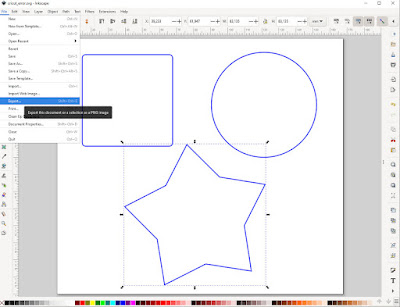
It sometimes happen that when opening an svg file, Cricut Design Space shows the error message Image load failure . Many people complain about this issue - sometimes even the files, that previously worked properly, suddenly don't load into the DS. Reddit thread about this error   It's very frustrating, because it's hard to find the reason. If you have a plotter template that doesn't work, you can try the following procedure. Install Inkscape - it's a free graphic software for creating and editing svg files, download available here . Open your svg file. Most plotter templates consist of many various shapes. In my example there are three simple ones: a square, a circle and a star. Now we want to split the project into single (or smaller) parts. Choose one shape (or more), then select File > Export :     Now you see a new window with Export options. The location of your file and give it a name (it must contain the .svg extension). Then choose Selection button and f...

Valentine surprise card - free template

Image
A greeting card with a box for a small, flat gift (like a pendant, earrings) or a chocolate candy etc. The card was originally designed for a cutting plotter, but the shapes are simple enough to cut them with a hobby knife. Files for download (printable pdf + svg for plotters + assembly instruction): zip For more templates visit my Etsy shop - use LOTTABLOG code by checkout to get 30% discount.  TOOLS & MATERIALS: cutting plotter supporting A4 format or a hobby knife optionally – any tool with a pointed but slightly rounded tip, like toothpick, knitting needle, ball-pen without ink etc. for scoring the fold lines A4 cardboard, weight ca. 170-200 gsm, for the envelope you can use thinner paper (~120 gsm) paper glue (a clear, solvent based is recommended, water based adhesives can buckle the paper) LINES DESCRIPTION:               black solid – cut lines - - - - -  black dashed – fold lines in the printable version  ...

3D flower greeting card with a surprise box - free plotter template

Image
A greeting card with a box for a small gift or a chocolate candy etc. Cut files for download: Svg for cutting machines like Cricut or Silhouette Dimensions chart (for Cricut users)  Printable pdf A4 Assembly instruction (pdf)  For more templates visit my Etsy shop - use LOTTABLOG code by checkout to get 30% discount.  TOOLS & MATERIALS: cutting plotter supporting A4 format optionally – any tool with a pointed but slightly rounded tip, like toothpick, knitting needle, ballpen without ink etc. for scoring the fold lines A4 cardboard, weight ca. 170-200 gsm, for the message you can use thinner paper paper glue (a clear, solvent based is recommended, water based adhesives can buckle the paper) LINES DESCRIPTION:               black – cut lines               red – fold lines.  In Cameo 4 I use the Score option, setting the lowest Force value (too deep cut may re...

Christmas tree pop-up card

Image
How could I not design a pop-up card with a Christmas tree? However, I didn't want to duplicate existing patterns. And I think I succeeded, I haven't seen a similar template anywhere else. Cut files for plotters (svg, pdf, studio3) are available at  lottain.etsy.com (pat. 034) - use LOTTABLOG code by checkout to get 30% discount.  The set includes a greeting card template (5 x 5 in / 127 x 127 mm)  and a matching envelope template. The card shown in the photos was made using ready-made patterned paper. However, the download also includes a seamless snowflake pattern (PNG file), which you can use to fill in parts of the tree and use with Print&Cut option of your machine.  Videotutorial: https://youtu.be/22C-4MnNlOU  Difficulty level: Very easy. It's just impossible to do it wrong! Tools & Materials: cutting plotter supporting A4 format A4 cardboard, ca. 150-170 gsm for the pop-up mechanism; y ou can use heavier cardstock for the card base. A4 thinner cra...

It's beginning to look a lot like Christmas - holly wreath card

Image
This card doesn’t use a traditional lifting pop-up mechanism. Instead, it relies on the natural springiness of the paper to create a 3D effect. It does have one big advantage: it’s quick and easy to make, especially when you need to produce a larger number of cards, for example, for a school fair. I designed this card to be cut with a cutting machine, but the shapes are simple enough to be easily cut by hand using a craft knife as well.   Cut files (svg, pdf, studio3) are available at  lottain.etsy.com (pat. 033) - use LOTTABLOG code by checkout to get 30% discount.  The set includes a greeting card template (5 x 5 in / 127 x 127 mm)  and a matching envelope template.   Difficulty level: Very easy. Tools & Materials: a cutting plotter supporting A4 format / alternatively a printer and a  craft knife A4 cardboard, ca. 150-170 gsm for the card elements; y ou can use heavier cardstock for the card base. A4 thinner craft paper for the envelope (ca. 90-120 ...

You don't need dozens of parts to make an eye-catching pop-up card

Image
My next pop-up card is actually based on a similar mechanism as the tulips vase . The parts look like that:     And here is the ready card in action:      Cut files are available at lottain.etsy.com (pat. 032) - use LOTTABLOG code by checkout to get 30% discount.

Boo! Halloween treat boxes

Image
 Let me introduce you a sweet spooky team: Closing the box: Cut files available at my Etsy shop (pat. 031) - use LOTTABLOG code by checkout to get 30% discount.

General tips for cutting faux leather + layered bracelet free pattern

Image
Faux leather is a great material for cutting with a plotter. It does not fray and comes in many colours, textures and patterns. It can be used to make cases, wallets, earrings, bracelets and many other fancy things. To cut fau x leather successfully (and avoid frustration, and save your precious mats…) , follow these tips: Use the strong adhesive mat. Place the leather on the mat with the right side down - it adheres much better. In addition, there is often some fluff on the left side that remains on the mat and cannot be removed. Avoid cutting multiple parts from a large sheet. It is better to cut them individually from smaller pieces. Additionally, fix the edges of the material to the mat with masking tape. Faux leathers varies in thickness. Always do a few tests before cutting out the final pattern. Avoid very small elements in your pattern (like tiny holes in lace patterns) - they may not come out well.   If want to glue faux leather, test the glue you p...

Extremely quick Easter paper baskets

Image
A completely new idea - assembly in 15 seconds and no glue needed! Cut files available at lottain.etsy.com - use LOTTABLOG code by checkout to get 30% discount.