Posts

Easter basket pop-up card

Image
 It's snowing outside, but papercraft designers are already thinking about Easter! Cut files are available at lottain.etsy.com (pat. 038) - use LOTTABLOG code by checkout to get 30% discount.         

You didn't get your Hogwarts Acceptance Letter?

Image
Don't worry, I'll help you to make a magic potion. Cut files are available at lottain.etsy.com (pat. 046) - use LOTTABLOG code by checkout to get 30% discount. Is it difficult? You can judge for yourself, just watch the videotutorial: https://youtu.be/SopB8ozJ4kk The detailed written assembly instruction (pdf) is available after purchase.  

My funny Valentine... mouse

Image
Mice are so cute (as long as they're not raiding your pantry). Cut files are available at lottain.etsy.com (pat. 046) - use LOTTABLOG code by checkout to get 30% discount. Is it difficult or very time consuming? You can judge for yourself, just watch the videotutorial: https://youtu.be/xK94oody7aE The detailed written assembly instruction (pdf) is available after purchase.          

I'm ready for Christmas 2024

Image
My new Christmas pop-up card is based on a quite simple box mechanism. You will, however, need some patience when assembling the snowflakes details. Cut files are available at lottain.etsy.com (pat. 043) - use LOTTABLOG code by checkout to get 30% discount. Is it difficult? You can judge for yourself, just watch the videotutorial: https://youtu.be/XKOqD-kJKW0 The detailed written assembly instruction (pdf) is available after purchase.    

Roses are red, my love (and pink, and white)

Image
My favourite pop-up project so far - three layers of semi-realistic roses in the oval basket. Assembly is easier than you might think :-) Cut files are available at lottain.etsy.com (pat. 041) - use LOTTABLOG code by checkout to get 30% discount.      

Peek-a-boo!

Image
I still have no shortage of pop-up card ideas. I hope you like cute bunnies. Cut files are available at lottain.etsy.com (pat. 040) - use LOTTABLOG code by checkout to get 30% discount.         And here's the card in action:      

Do you like Cricut bugs?

Image
[EDIT] Problem solved by Cricut in the current update. No, not this one:   Design space has a new one for you. After trying to load svg file you'll see something like that:     This is not a template error, but a DS bug after the last update - follow the Reddit thread to solve the problem:  https://www.reddit.com/r/cricut/comments/1crh8cf/comment/l47gpmc/ Only desktop version is affected, mobile Cricut app loads svg files correctly.  

The most irritating Cricut issue

You've just loaded svg into Cricut Design Space and some parts of the template are huge or tiny? It's not because the file is incorrectly designed! It's the well known bug in Cricut software. DS just resizes the pieces of the pattern randomly - many Cricut users complain about this issue for years and... it still hasn't been fixed.  Here's my collection of links describing the problem: https://www.reddit.com/r/cricut/comments/ghlkmk/size_changes_when_uploading_to_cricut_design_space/ https://www.reddit.com/r/cricut/comments/ooz1gm/preventing_design_space_resizing_images/ https://www.reddit.com/r/cricut/comments/vs78hv/svg_uploading_super_tiny_in_cricut_design_space/ https://www.reddit.com/r/cricut/comments/ddplza/weirdness_importing_svg_files/ https://www.reddit.com/r/cricut/comments/y74hae/question_about_design_space_and_svg/ https://youtu.be/_eqiWJqkgWA?si=DFm9cEo_PUS0Iuwh And here's my solution: http://lottaincraftland.blogspot.com/2024/04/cricut-design-space...

Cricut Design Space - templates parts huge / tiny

Image
Sometimes after loading SVG file into Crucit Desin Space some parts of the template are disproportionately huge or tiny and they don't match each other. The best way to fix the problem is just to set the right size manually. But how do you know what the correct dimensions are? Install Inkscape - it's a free graphic software for creating and editing svg files, download available here . And I assure you'll need it more often if you use Cricut. It allows to solve many problems with templates. Open your SVG file in Inkscape. From the drop-down list select the units you are going to use. Select the part - and now you can see its width (W:) and height (H:)  Load the same file into Cricut Design Space and c ompare the dimensions. If they differ, just change them for the same as displayed in Inkscape.  

Cupcoasters - free plotter template

Image
 The cupcoasters require no instruction :-) Free download (svg + pdf) : zip For more templates visit my Etsy shop - use LOTTABLOG code by checkout to get 30% discount.     

Easy rose insert card - free plotter template

Image
A very easy insert card, prepared for two occasions (birthday and Mother's Day), two language versions English and German). Free download (cards + envelope): zip For more templates visit my Etsy shop - use LOTTABLOG code by checkout to get 30% discount.  If you would like to add a sweet surprise to the card, visit my Etsy shop for a rose basket template .

Something sweet once again

Image
Fortunately, I prefer to be inspired by sweets rather than eating them. The new pop card is a lollipops stand - great for birthdays (a less clichéd motif than a cake) and other occasions.    Cut files are available at lottain.etsy.com (pat. 037) - use LOTTABLOG code by checkout to get 30% discount.

Sweet Valentine's Day

Image
This idea for a Valentine's Day card came many weeks earlier, in December, while baking. Let gingerbread hearts make us happy not only at Christmas! Cut files are available at lottain.etsy.com (pat. 036) - use LOTTABLOG code by checkout to get 30% discount.   

faux leather bracelets - free plotter template

Image
Cut files for download (svg + pdf + instruction + sizes chart): zip TOOLS, MATERIALS AND TIPS: cutting plotter leather (natural or faux), felt, vinyl or any other material suitable for bracelets leather glue General tips for cutting faux leather   LINES DESCRIPTION: – – – black – lace bracelets cut lines – – – magenta – bottom layer MAKING LAYERED VERSION:   For the layered version you have to cut the lace bracelet and the bottom layer. Apply glue on the edges of the bottom layer and in spots between the motives as shown on the photo below.   Place the bottom layer exactly in the middle (it’s a little smaller than the bracelet base), press and let the glue dry. Install snaps or another fastener of your choice.   Do you want more? Visit my Etsy shop for a really huge DYI bracelets templates set .

Cricut Design Space "Image load failure"

Image
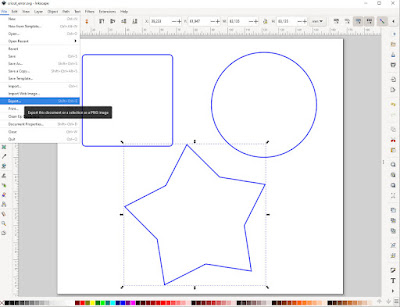
It sometimes happen that when opening an svg file, Cricut Design Space shows the error message Image load failure . Many people complain about this issue - sometimes even the files, that previously worked properly, suddenly don't load into the DS. Reddit thread about this error   It's very frustrating, because it's hard to find the reason. If you have a plotter template that doesn't work, you can try the following procedure. Install Inkscape - it's a free graphic software for creating and editing svg files, download available here . Open your svg file. Most plotter templates consist of many various shapes. In my example there are three simple ones: a square, a circle and a star. Now we want to split the project into single (or smaller) parts. Choose one shape (or more), then select File > Export :     Now you see a new window with Export options. The location of your file and give it a name (it must contain the .svg extension). Then choose Selection button and f...

Valentine surprise card - free template

Image
A greeting card with a box for a small, flat gift (like a pendant, earrings) or a chocolate candy etc. The card was originally designed for a cutting plotter, but the shapes are simple enough to cut them with a hobby knife. Files for download (printable pdf + svg for plotters + assembly instruction): zip For more templates visit my Etsy shop - use LOTTABLOG code by checkout to get 30% discount.  TOOLS & MATERIALS: cutting plotter supporting A4 format or a hobby knife optionally – any tool with a pointed but slightly rounded tip, like toothpick, knitting needle, ball-pen without ink etc. for scoring the fold lines A4 cardboard, weight ca. 170-200 gsm, for the envelope you can use thinner paper (~120 gsm) paper glue (a clear, solvent based is recommended, water based adhesives can buckle the paper) LINES DESCRIPTION:               black solid – cut lines - - - - -  black dashed – fold lines in the printable version  ...

3D flower greeting card with a surprise box - free plotter template

Image
A greeting card with a box for a small gift or a chocolate candy etc. Cut files for download: Svg for cutting machines like Cricut or Silhouette Dimensions chart (for Cricut users)  Printable pdf A4 Assembly instruction (pdf)  For more templates visit my Etsy shop - use LOTTABLOG code by checkout to get 30% discount.  TOOLS & MATERIALS: cutting plotter supporting A4 format optionally – any tool with a pointed but slightly rounded tip, like toothpick, knitting needle, ballpen without ink etc. for scoring the fold lines A4 cardboard, weight ca. 170-200 gsm, for the message you can use thinner paper paper glue (a clear, solvent based is recommended, water based adhesives can buckle the paper) LINES DESCRIPTION:               black – cut lines               red – fold lines.  In Cameo 4 I use the Score option, setting the lowest Force value (too deep cut may re...

Clover surprise card - free plotter template

Image
A greeting card with a box for a small gift or a chocolate candy etc. Cut files for download: Svg for cutting machines like Cricut or Silhouette Dimensions chart (for Cricut users)  Printable pdf A4 Assembly instruction (pdf)    For more templates visit my Etsy shop - use LOTTABLOG code by checkout to get 30% discount.  TOOLS & MATERIALS: cutting plotter supporting A4 format optionally – any tool with a pointed but slightly rounded tip, like toothpick, knitting needle, ballpen without ink etc. for scoring the fold lines A4 cardboard, weight ca. 170-200 gsm, for the message you can use thinner paper paper glue (a clear, solvent based is recommended, water based adhesives can buckle the paper) LINES DESCRIPTION:               black – cut lines               red – fold lines. In Cameo 4 I use the Score option, setting the lowest Force value (too deep cut may re...